



Safety software for construction has exploded in the past few years. There are tools for company forms, sign-ins, inspections, permits, and a growing number of platforms claiming to do it all. For a general contractor trying to cut through the noise, it can be confusing.
The problem most buyers run into is evaluating software on features alone. One platform has a better dashboard. Another has a cleaner mobile app. A third has a longer feature list. None of that tells you whether the tool will actually be used on site or whether it'll hold up in a compliance audit.
Check out this safety software buyer’s guide to explore your options and learn how to choose the right solution for any US contracting firm, no matter your budget or company size.
Where do you start when choosing construction safety software?
When you look at different software it's easy to get lost in the many feature offerings. The question you really need to ask is: will this tool change how safety gets captured on my jobsites?
Features are table stakes. The real differentiator is whether the software fits the workflow, gets adopted in the field, and gives you something defensible when an insurer or OSHA inspector comes knocking.
That means before you evaluate any specific tool, you need to understand what you're solving for. A mid-size GC running five commercial projects with 20 subcontractors each has very different needs from a specialty sub managing a self-performing crew of 30. The right software for one may not be suitable for the latter.
Start by answering these questions:
- Where does safety documentation currently break down for your teams?
- Who is responsible for completing safety records on site — the worker, the foreman, or the back office?
- What happens when OSHA shows up, or an insurer requests documentation? How long does it take to pull records?
- Are you already running Procore, Autodesk, or another project management platform?
- Do you have a dedicated safety administrator, or does this need to run without one?
The answers will shape which features you actually need, and which ones are just nice to have.
What Are the Essential Features of Construction Safety Software?
1. Digital Worker Sign-In and Real-Time Attendance Tracking
This is the foundation. A General Contractor should know who’s on site at any given time. A good safety software replaces paper sign-in sheets with a digital record that's accurate, searchable, and tied to a real worker identity.
Look for a safety software that offers:
- Multiple sign-in methods (QR codes, kiosks, & foreman-managed check-in)
- Real-time visibility of who's currently on site
- The ability to pull the sign in data instantly for evacuations or emergency roll calls.
Accurate, timestamped attendance records give you the manpower hours that can feed into your Project Management System and your cost reporting. When this runs on paper, hours get estimated or forgotten. When it's digital and tied to actual sign-ins, the data is reliable.
2. Digital Orientations with Multilingual Support
According to the National Hispanic Construction Alliance, Hispanic workers make up more than 30 percent of the U.S. construction workforce and fill close to 85 percent of trade and general labor roles. That share continues to grow.
Spanish is the most common non-English language on U.S. construction sites, but it is not the only one. Crews may include workers who speak Portuguese, French, Polish, or other languages. Even within Spanish-speaking teams, dialects and terminology vary.
Assuming one language will cover everyone is where preventable risk begins.
OSHA clearly states, “Employers must provide safety training in a language and vocabulary workers can understand.” This is a compliance requirement, not a recommendation. General contractors who fall short face regulatory exposure, particularly if an incident occurs and a worker can credibly claim they did not understand the orientation.
Look for a platform that supports orientation content in multiple languages, particularly English and Spanish, and that allows workers to complete orientations digitally before they arrive on site. Getting workers through orientations faster means less time in the jobsite trailer and more time on the tools — which matters when crews are already stretched thin.
The orientation should also create a durable record. Not just a checked box, but a timestamped, signed document tied to that worker's profile and attached to the project.
3. Critical Safety Documents for Daily Tasks
Critical safety documents (such as Pre-Task Plans and JHAs) completed in the morning, signed by the crew, and submitted to the GC are both a safety measure and a legal record. When this process runs on paper, signatures get missed, records get lost, and the GC has nothing to show in a post-incident review.
The right software makes this fast and field-native. Foremen should be able to complete a pre-task plan or JHA in minutes, add their crew, collect signatures on the device, and submit it — all before the work starts. The GC's safety manager should see that submission immediately, not at the end of the week.
The same applies to high risk activity permits for works such as open-flame operations, ground disturbance and lockout/tagout. Every permit should be time-stamped, stored permanently, and accessible instantly.
4. Training and Certification Management
On a commercial site, knowing that a worker has an OSHA 10 card isn't enough. You need to know it's current, you need it on file, and you need to be able to find it when asked.
Look for a software that lets workers upload certifications directly, tracks expiry dates proactively, and surfaces credentials in a searchable register. This removes the back-and-forth of chasing subcontractors for paperwork before mobilization.
The best systems carry certification records across projects (like a worker passport) — so a worker who uploads their OSHA 10 card once doesn't have to resubmit it to every GC they work with.
5. SSSP and SDS Management (Pre-Mobilization Compliance)
Before a subcontractor's crew sets foot on site, their company documentation needs to be reviewed and approved. Site-Specific Safety Plans, Safety Data Sheets, chemical registers, and high-hazard activity plans all need to be collected, verified, and filed.
Most GCs manage this by email, which means documents end up scattered across inboxes, some never arrive at all, and pulling a clean record for an audit means scrambling through folders. A safety tool that centralizes this process — with automated submission requests, status tracking, and approval workflows — turns a chaotic back-office task into something that just runs.
6. A Foreman-Led Workflow
This is the feature that separates softwares designed for how construction actually works from platforms designed for a compliance officer's spreadsheet.
On a commercial jobsite, the foreman is OSHA's "competent person." They own the risk for their crew. They take responsibility for getting their people through orientation, submitting pre-task plans, and applying for high risk activity permits. Any safety platform that ignores this reality creates friction instead of removing it.
A foreman-led workflow means they can manage sign-ins, submit daily documentation, and handle their crew's compliance through a single interface on their phone. Workers don't each need to interact with the app separately. That alone solves one of the most persistent problems on any jobsite — incomplete sign-ins, liability gaps, and lost labor hour data.
For the GC, this means real-time visibility into every subcontractor's crew without chasing anyone. For the foreman, it means a tool built around their existing routine rather than layered on top of it.
7. Searchable Audit Trails and Regulatory-Ready Reporting
When an OSHA inspector arrives or an insurer requests documentation, your ability to respond depends entirely on whether your records are searchable. A paper binder from a jobsite completed two years ago is not searchable (well, not easily anyway). Neither is a folder of scanned PDFs with inconsistent naming conventions.
The software you choose should maintain a complete, searchable audit trail linked to individual worker identities. Every orientation, every JHA, every permit, every sign-in — time-stamped, tagged to a project, and retrievable in seconds. This is the legal defensibility layer that makes safety software worth the investment.
Look for reporting features in a safety software that can generate audit-ready summaries without manual assembly. The less your team has to touch the data to produce a compliance report, the better.
8. Integration with Your Project Management Platform
According to Mordor Intelligence, the average contractor runs 11 discrete applications, and only about a third of them exchange data without manual workarounds. That manual gap is where the admin burden lives.
If you're running Procore or Autodesk, the safety tool you choose should integrate with it directly. That means manpower hours feeding automatically into your daily reports, safety documents populating your project document library, and certifications syncing without any manual entry. When these systems talk to each other, the value of each one goes up. When they don't, you have parallel records that don’t align and site teams spending time bridging the gap.
How Do You Evaluate Safety Software?
The most effective technology removes friction from the process rather than adding them. A safety tool that creates additional administrative work will never get consistent adoption, and inconsistent adoption produces worse outcomes than no tool at all.
When you're evaluating any construction safety platform, run it through these four criteria:
Does it remove steps or add them?
If field teams need to do more to use the safety tool than they currently do on paper, you'll get half-hearted engagement. The resulting data will be patchy, and the GC's picture of what's happening on site will be no clearer than before. The best tools insert themselves into existing behaviors — the foreman meeting, the morning toolbox talk, the sign-in at the trailer — rather than inventing new routines.
Will field teams actually use it?
Digital adoption in construction is notoriously difficult. Even user-friendly tools struggle when the people asked to use them don't understand why. Look for vendors who offer dedicated implementation support, not just a video library. The software needs a human who understands field dynamics to champion it during rollout and troubleshoot resistance early.
Does it fit your existing tech stack?
When good integrations exist, the software is easier to implement, doesn't create duplicate work, and starts delivering value immediately. When it doesn't integrate, you're managing a separate silo. Before committing, confirm exactly how the tool syncs with your existing platforms — not just that an integration exists, but what it actually does (not all integrations are built equal).
Can field teams use it without a training program?
Field teams and workers are already stretched thin. If they need dedicated training sessions, a manual, and an admin to answer their questions, adoption will be slow and fragile. The best field safety tools are intuitive enough that a foreman can sign their crew in on the first day without having seen the platform before.
How Do Construction Safety Tools Compare by Company Size?
Different company profiles need different things from safety software. Here's how that breaks down:
Mid-market GC ($15M–$500M), commercial projects, multiple subcontractors
What you need: a platform built for the GC-to-sub workflow with a foreman-led workflow engine, easy-to-use design, centralized documentation, and Procore integration. The tool should run without dedicated IT support and be adoptable without a formal rollout program.
What to avoid: enterprise platforms that require a full-time administrator, or forms-only tools that digitize paper without enforcing prerequisites or building a compliance trail.
Enterprise GC ($2B+), full safety program replacement
What you need: an end-to-end safety ecosystem you can configure to your own standards, with strong incident management, observation workflows, and deep analytics. You have the resources to manage a complex implementation and benefit from the full feature set.
What to avoid: lightweight tools that don't support the depth of reporting or customization your safety team needs.
Specialty contractor or trade sub, self-performing crew
What you need: a simple way to digitize internal forms, track your crew's certifications, and produce records when your GC requests them. Low friction, minimal setup, basic reporting.
What to avoid: GC-focused platforms priced and designed for managing subcontractors rather than for the subcontractors themselves.
Is construction safety software worth the investment?
Most buyers evaluate safety software on its front-end benefits: faster orientations, digital forms, and mobile access. That's real value, but it's not where the return on investment is most significant.
The back-end is where safety software earns its keep. Consider what your team currently spends time on: scanning paper documents, manually filing incident records, chasing signatures from subcontractors, assembling compliance records when an audit arrives. A platform that eliminates those tasks gives your safety managers and site teams hours back every week — hours that go toward actual safety oversight rather than paperwork management.
The other ROI calculation is liability. A single OSHA violation for a serious hazard costs over $16,000. A willful or repeated violation exceeds $165,000. An insurer who can't get the documentation they need during a claim review can deny coverage. The audit trail a good safety platform creates isn't just a compliance box — it's profit protection.
What is our recommendation?
If you're a mid-market to enterprise US general contractor running commercial projects with multiple subcontractors, you're probably already on Procore or Autodesk. You're accountable for OSHA compliance across the entire site, and your safety managers are spending too much time on paperwork and not enough on actual safety oversight.
The software you need is built around the foreman-led, worker-journey workflow that defines how safety actually operates on a commercial jobsite. It should plug into your project management platform without replacing it, run without a dedicated administrator, and be simple enough that a foreman can use it from day one without a training program.
Sound familiar?
If so, Breadcrumb is worth a look. It's built specifically for this use case — a field-first safety and productivity tool designed for the GC-to-sub workflow, with two-way integrations with Procore and Autodesk, and a foreman-led workflow engine at its core.
What is Breadcrumb?
Breadcrumb is a modern jobsite safety and compliance tool built for the construction industry in the United States and operating globally across the United Kingdom, Ireland, Australia, and New Zealand.
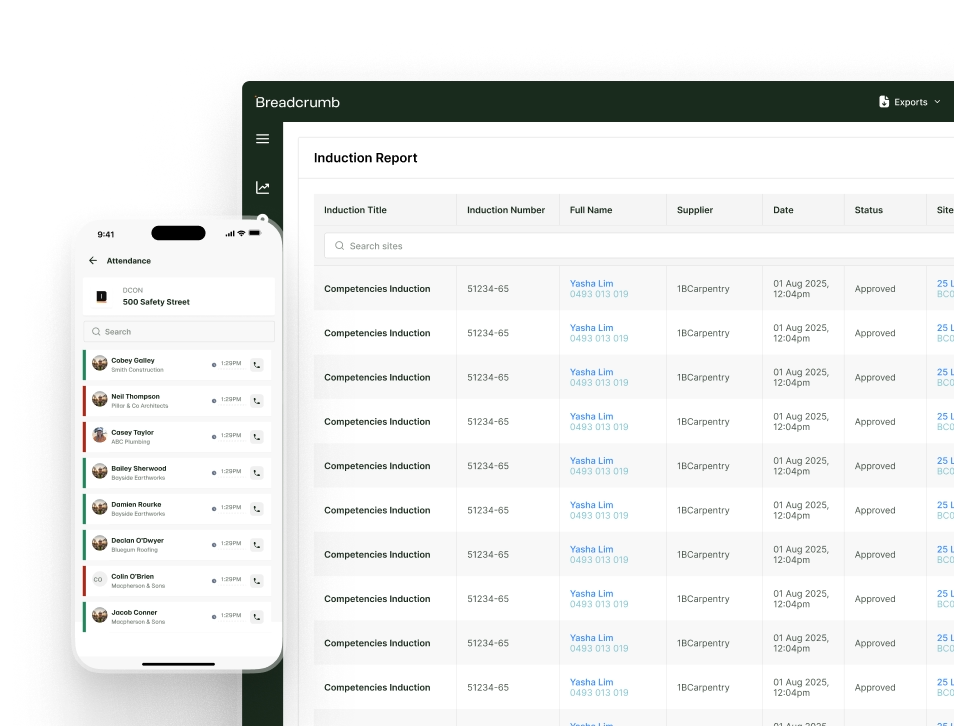
With a focus on digitizing vital safety documentation and increasing visibility of worker sign-in and attendance, we empower jobsite teams to manage projects safely and efficiently. Available on mobile and desktop, Breadcrumb integrates with Procore and Autodesk in real-time — keeping all your core project information in one place.
It’s the ideal construction safety software solution for US Contractors.
Want to learn more about how Breadcrumb can help your mid-market or enterprise general contracting firm? Book a demo and learn how Breadcrumb can help you reduce risk, remove liability from your business, and improve productivity.
Frequently Asked Questions
What is construction safety software?
Construction safety software replaces paper-based site processes — sign-in sheets, orientations, pre-task plans, permits, and certification tracking — with digital tools that create a searchable, time-stamped record. The record is what makes it useful: it's what you pull when OSHA shows up or an insurer asks for documentation.
What features should I look for in construction safety software?
Eight matter most: digital worker sign-in with real-time attendance, multilingual digital orientations, daily safety documents like Pre-Task Plans and JHAs, training and certification management, SSSP and SDS management for pre-mobilization compliance, a foreman-led workflow, searchable audit trails with regulatory-ready reporting, and integration with your existing project management platform (Procore or Autodesk).
Why does construction safety software need multilingual support?
Because OSHA requires it. Employers must deliver safety training in a language and vocabulary workers understand. Hispanic workers make up more than 30 percent of the U.S. construction workforce and fill close to 85 percent of trade and general labor roles, and Spanish is the most common non-English language on U.S. sites, though not the only one. A GC that runs orientations in English only is carrying regulatory exposure, especially if an incident happens and a worker can credibly say they didn't understand the material.
What is a foreman-led workflow in safety software?
It's a design where the foreman — OSHA's "competent person" for their crew — manages sign-ins, submits daily documentation, and handles permits for the whole crew through one interface, instead of each worker interacting with the app separately. This matches how commercial jobsites actually operate and avoids the incomplete sign-ins and lost labor-hour data that come from forcing every worker onto the platform individually.
Does construction safety software need to integrate with Procore or Autodesk?
For any GC already running one of those platforms, yes. The average contractor uses 11 discrete applications, and only about a third exchange data without manual workarounds, according to Mordor Intelligence. A safety tool that integrates directly means manpower hours, safety documents, and certifications sync automatically instead of living in two disconnected records that site teams have to reconcile by hand.
Does construction safety software differ by company size?
Yes. A mid-market GC ($15M–$500M) running commercial projects with multiple subs needs a foreman-led workflow, centralized documentation, and a Procore or Autodesk integration that works without a dedicated administrator. An enterprise GC ($2B+) needs a full end-to-end safety ecosystem with deep configurability and analytics. A specialty trade sub needs something much simpler: digitize internal forms, track crew certifications, and produce records on request — without paying for a platform built to manage subcontractors rather than serve them.
How do I know if field teams will actually use a safety tool?
Test it against four questions before buying: Does it remove steps from existing routines or add new ones? Can a foreman use it on day one without training? Does it plug into your current tech stack without creating a duplicate record? And does the vendor offer real implementation support, not just a video library? Tools that insert themselves into the morning toolbox talk or trailer sign-in get adopted. Tools that invent a new routine don't.
What is Breadcrumb?
Breadcrumb is a construction safety and compliance tool built for the GC-to-sub workflow, used across the United States, United Kingdom, Ireland, Australia, and New Zealand.With a focus on digitizing vital safety documentation and increasing visibility of worker sign-in and attendance, Breadcrumb empowera jobsite teams to manage projects safely and efficiently. Available on mobile and desktop, Breadcrumb integrates with Procore and Autodesk in real-time — keeping all your core project information in one place.
built for the field.
